AlcorFinance: opportunity cost for assets that do not share a time horizon
Three calculators on one page. The first restates every holding as what the same principal would have become at one comparison rate over that holding’s own term.
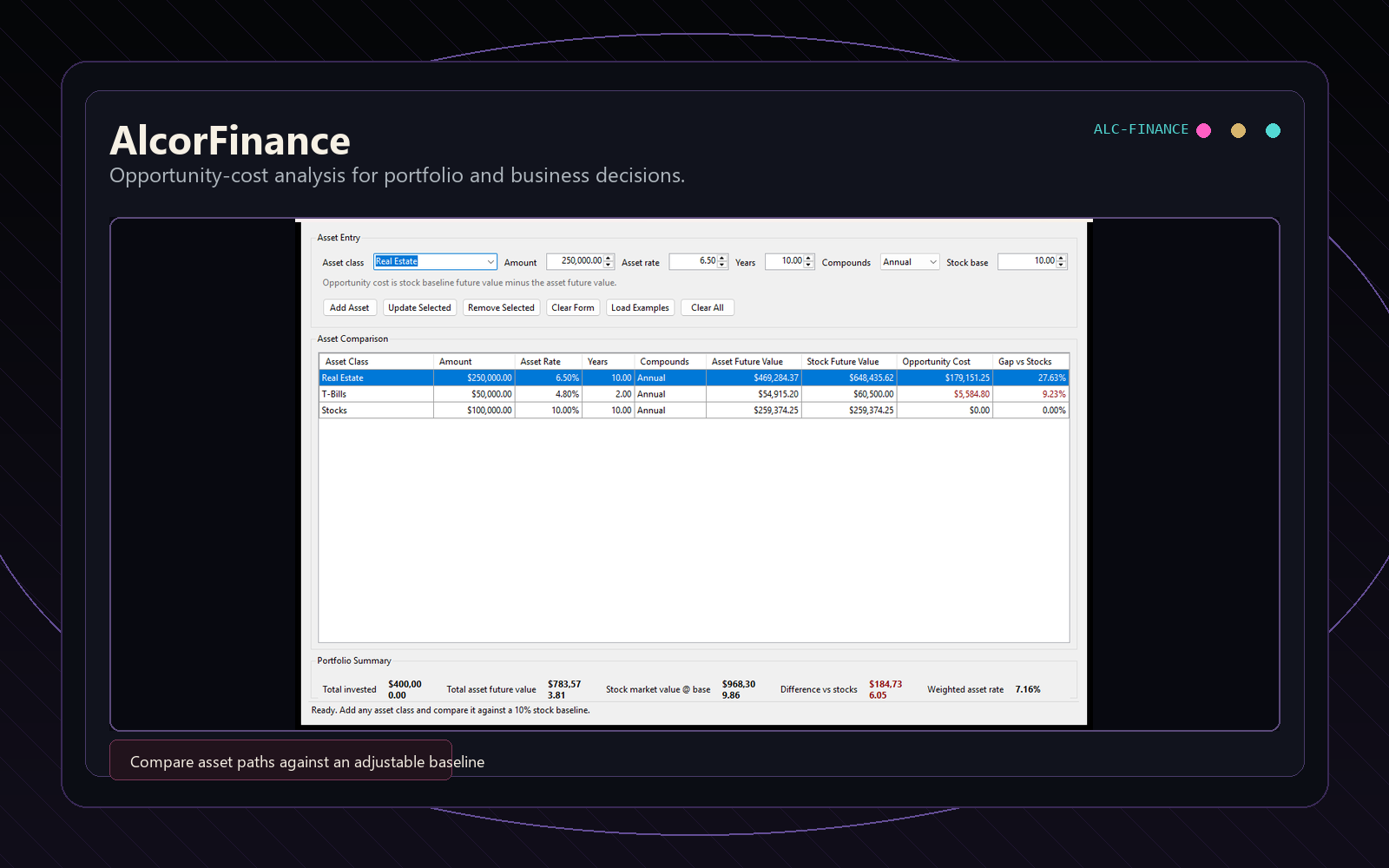
The opportunity-cost calculator with the example rows used in this note.
The problem
A rate on its own settles very little when two holdings do not share a horizon. The calculator’s example set includes $50,000 of T-Bills at 4.8% for two years and $250,000 of real estate at 6.5% for ten. The T-Bills compound to $54,915.20; the real estate compounds to $469,284.37. Comparing 4.8% to 6.5% does not make those positions comparable, and comparing their ending dollar values is worse.
AlcorFinance gives every row a common alternative. It compounds the same principal at a stock-market baseline over that row’s own term, then subtracts the asset outcome. At a 10% baseline, the real-estate alternative is $648,435.62, so the gap is $179,151.25, or 27.63% of the stock outcome. The T-Bill gap is $5,584.80, or 9.23%.
What the page does
You enter up to 20 holdings, each with a name, amount, yearly rate and term in years. Every row shows what the holding grows to, what the same amount grows to at the baseline, the difference, and that difference as a share of the baseline outcome. A two-year instrument and a ten-year holding fit in the same table because the baseline is recomputed over each row’s own term.
The baseline is a number you type, not market data. Change it and every row and the totals update as you type. Dropping the baseline from 10% to 6.5% makes the example real-estate row’s opportunity cost $0 because the two rates now match, while holdings above the baseline show a negative opportunity cost in green.
The same page has two more calculators. The loan calculator works out a fixed-rate monthly payment and the full schedule, by year or by payment: $300,000 at 6% for 30 years is $1,798.65 a month. The break-even calculator takes fixed costs, price and cost per unit and gives the units and sales you need, plus profit at half, one and a half and twice that volume.
Each calculator saves the scenario in the page link, so copying the link shares it. You can also download a CSV or print a clean copy. The page is a standalone document that loads no analytics or ad scripts, and its content security policy blocks it from sending anything, so the numbers you type stay in your browser.
Growth compounds once a year, and loans are fixed-rate with monthly payments.
No taxes, fees, inflation, monthly contributions, withdrawals or market data.
The average rate is weighted by amount and ignores term.
Totals add values reached in different years, so they compare each row with its own alternative rather than giving one portfolio value on one date.
It gives estimates only, not financial advice.
BUILD NOTE 02 · PRODUCTION WORDPRESS PLUGIN
AlcorOS: the WordPress app platform this site runs on
One plugin for this site’s analytics, contact form, site health and the desktop demo.
First, the naming collision
AlcorOS means two things at Alcor. The Products & Projects page uses the name for the desktop environment and AlcorApps. This note is about the WordPress plugin. Same name, separate code.
The problem
A WordPress site needs tracking, a contact form that keeps spam out, and a way to inspect basic health. On many sites those become unrelated plugins with separate settings, tables, mail paths, and assumptions. AlcorOS takes the other approach: one plugin, a shared settings row, and apps that can be enabled per site.
What is in the current production build
AlcorAnalytics owns its event and blocklist tables. Its inline tracker records pageviews, delegated clicks, and form submissions for logged-out visitors. GA4 and Meta are optional; with their IDs blank, the site runs first-party tracking only. The public ingest route accepts three event types and soft-limits each IP to 120 events per active burst; the counter resets after that IP has been quiet for a full minute. Blocked IPs are refused; watched IPs are accepted and flagged.
AlcorContact renders the short homepage form and the longer buyer-page form. It scores a hidden honeypot, unrealistically fast completion, excessive links, repeated posts, and the IP blocklist. Clean submissions receive a per-render UUID, are written to the structured opportunity store, deduplicated, emailed with Reply-To set to the sender, and only then become a conversion signal. Attribution is stored from an allowlist that excludes the person’s name, email, company, website, and freeform message.
AlcorSiteManager provides local health probes, seven-day event counts, page links, and route visibility. AlcorDemo renders the dock, taskbar clock and draggable windows on the public demo page. Each window describes one of this site’s browser apps and links to it.
How the app contract works
The core registers bundled apps, then can load deployed apps from wp-content/alcoros-apps. An app is a class with a static initializer, a file, a label, and a description. Cross-app calls are guarded, so the contact form does not require analytics to be enabled.
Administrator-only deployment routes stage zip payloads, reject traversal-like entries, optionally lint PHP when a CLI is available, back up the current target, and restore that backup if the copy fails. Only administrators can use these routes. There’s no public app store and no outside security review.
What it doesn’t do yet
We don’t publish install counts, event volume, conversion lift or spam-block counts.
The analytics app stores events and shows admin tables. It doesn’t replace a full analytics product.
The contact form’s spam filter is those five checks. There is no CAPTCHA or outside spam service.
The deployment routes are for administrators only. They aren’t a public product.
BUILD NOTE 03 · BROWSER EDITOR
AlcorQR: putting a logo in a QR code without breaking it
The AlcorQR editor draws the code in your browser, puts your logo in the middle, and exports PNG or SVG. This is what it does to keep that code readable.
Rounded modules, colored finder patterns and a center mark at error-correction level H. It encodes the address of the AlcorQR page.
The problem
A logo in the middle of a QR code covers modules, the small dark and light squares the scanner reads. The code still reads because of error correction: extra Reed–Solomon data that lets a scanner rebuild what it can’t see. Level H, the highest, recovers roughly 30% of the data codewords. A logo spends part of that before the code meets a glossy menu or a folded flyer.
What the editor does
Add a center mark and the editor switches error correction to H and keeps it there until the mark is removed. The mark can be 8% to 20% of the code’s width, so it covers only a few percent of the modules and leaves most of the recovery budget for glare, smudges and cheap printers. The border around the code never drops below four modules.
Modules, background, the three corner squares (called finder patterns) and the backdrop behind the mark each get their own color. The editor warns when a combination is low in contrast and won’t export one that is too low to scan. You can pick square, rounded or dot modules; the finder patterns keep their standard shape.
SVG logos get extra handling, because an SVG file can carry scripts, links to other sites and embedded pages. The editor reads the upload as an image, removes scripts, event handlers, animation, stylesheets, embedded media and anything that points outside the file, caps it at 4,096 elements, and only then draws it. It is never inserted into the page.
The link or text you encode and the logo you upload stay in your browser. The editor page loads no analytics or ad scripts. Exports are a PNG from 512 to 4,096 pixels, or an SVG with vector modules and the logo embedded.
No dynamic codes. The link is baked into the code, so a printed code can’t be pointed somewhere else later.
No scan analytics, dashboards or bulk generation.
No account and no checkout.
It can’t promise every styled code will scan. Test the downloaded file at its real size, on the real material, with more than one phone, before a print run.
If you want the code made and tested for a specific print job, custom branded QR design starts at $200.
Your project
Need a tool like this for your business?
Tell us what you need in a few sentences. We reply by email with questions or a written quote, and you own the code we deliver.